Thursday, November 29, 2018
Math?!?
This year i've been using alot of math in my projects. One of the most common things I am using is the LERP functions, whether its for lerping the position of a platform, the color of an object, or the pitch of music. LERP, defined as "The basic operation of linear interpolation between two values," is extremely common in game development. It is also found alot in art and animation.

Wednesday, May 2, 2018
Math 5/2/18
This past week I have been working with a fair amount of math.
In my adventure to learn more about C# In unity I created a small demo where you can place blocks around a map.
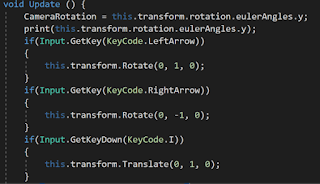
The code above calculates the Camera's rotation angle in Euler angles and then rotates the block appropriately so that the block will always be moving the correct way no matter what the camera rotation is.
In my adventure to learn more about C# In unity I created a small demo where you can place blocks around a map.

The code above calculates the Camera's rotation angle in Euler angles and then rotates the block appropriately so that the block will always be moving the correct way no matter what the camera rotation is.
Monday, April 2, 2018
Game Jam! - Get me out of here!
The week before spring break we had a game jam, and the theme was 'Get me out of here!' An interesting topic, to say the least. Our team took a take on the classic Prison Escape genre. Except instead of figuring it out yourself, you are hinted on how you should escape via text boxes.
I had to adapt to several new ways of coding that I have not tried before in order to get the result that the game designers wanted. This included learning how to use major UI in the game in order to give off the text box, interact button, and more. I also had to adapt to intractable events and how to get them to work.
Below is the code for the player script. It is ugly. You have been warned.


I guess the best place to start is the player Start in the player script. This is finding the animator and rigid body which are both used later in the script. It is also setting the narrator name to Narrator.

The next lines of code are used to spawn the player in the next level's spawn position. It finds any gameobject in the world with the name spawn, gets it's transform. and moves the player to the spawn's position. It also resets the interact and caught variables.

The code above is used to solve an issue the game was having. Basically, if you were caught it reloaded the first level. It would then duplicate the player do to the DontDestroyOnLoad function. So this prevents that from happening with a simple bool.


I am not proud of this code, but it gets the job done. Basically instead of setting up a simple base for every intractable object I wrote an if statement. For. Every. Single. Thing. Yikes.

This is where is starts to get ugly. In order to save time because it was a game jam, I skipped setting up any base code for anything. I also didn't set up Axis controllers or a good movement script. I set it up so you could only use WASD. and E for interact.

The player script also had an if for every collision. Yikes. I could have solved this by using a case or switch function.

I also made a quick image fade for scene transitions.
I had to adapt to several new ways of coding that I have not tried before in order to get the result that the game designers wanted. This included learning how to use major UI in the game in order to give off the text box, interact button, and more. I also had to adapt to intractable events and how to get them to work.
Below is the code for the player script. It is ugly. You have been warned.

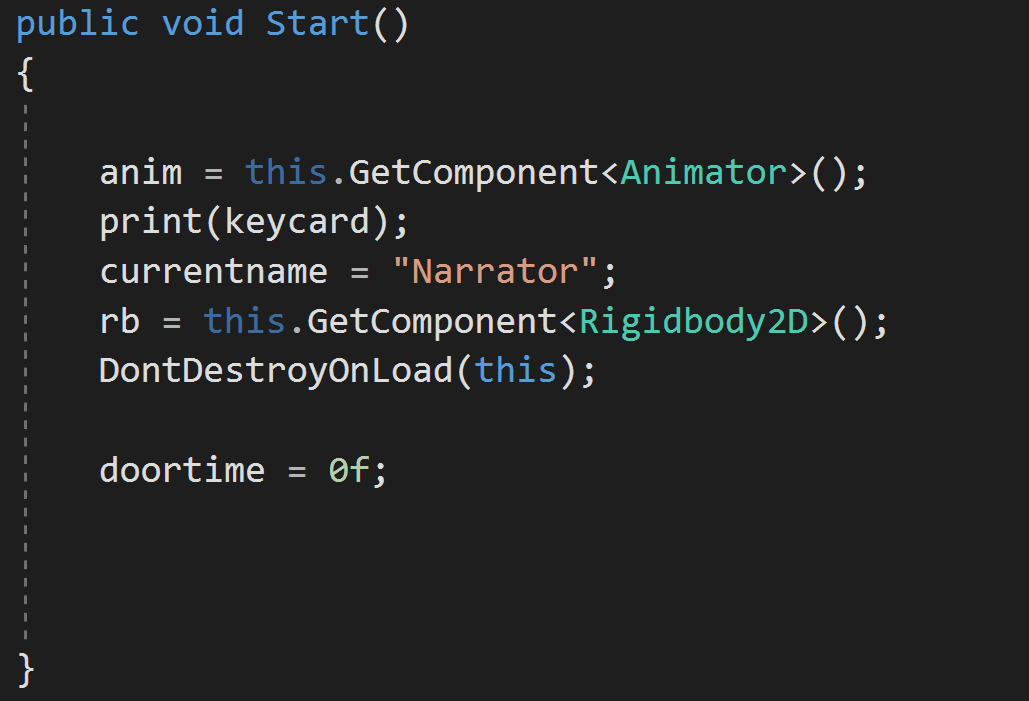
I guess the best place to start is the player Start in the player script. This is finding the animator and rigid body which are both used later in the script. It is also setting the narrator name to Narrator.

The next lines of code are used to spawn the player in the next level's spawn position. It finds any gameobject in the world with the name spawn, gets it's transform. and moves the player to the spawn's position. It also resets the interact and caught variables.

The code above is used to solve an issue the game was having. Basically, if you were caught it reloaded the first level. It would then duplicate the player do to the DontDestroyOnLoad function. So this prevents that from happening with a simple bool.


I am not proud of this code, but it gets the job done. Basically instead of setting up a simple base for every intractable object I wrote an if statement. For. Every. Single. Thing. Yikes.

This is where is starts to get ugly. In order to save time because it was a game jam, I skipped setting up any base code for anything. I also didn't set up Axis controllers or a good movement script. I set it up so you could only use WASD. and E for interact.

The player script also had an if for every collision. Yikes. I could have solved this by using a case or switch function.

I also made a quick image fade for scene transitions.
Monday, February 26, 2018
2/26/18 - Math Inside the Player Script
This week for math I will be looking at the player script for Chandler and I's game. This script contains a fair amount of math in it.

 To start we will look at the variables that are used inside of this script. There are alot. At the top we have the basic player stats, such as health, maxhealth, and level. Below that we have the Misc Player info, which could be brought into play later in development. Below that we have a misc placeholder for the healthbar. Then we have all of the Projectile Variables, such as the power, timebetween shots, and more. These are used to store all of the information needed when the player is firing a shot. After that we have all of the player movement variables such as speed, Camera variables, and more. These will all be used later on in the scripts, and can be set in the properties of the object so you do not have to edit the script when you want to make a change.
Next, we have the start function. This will run when the game starts. It will first set the projectile type to the most basic type, as thats what you start out with. Next it sets health to mac, and sets the healthbar to the proper gameobject. It then sets all of the projectile stats to 0, and assigns the camera to the Cameraholder.
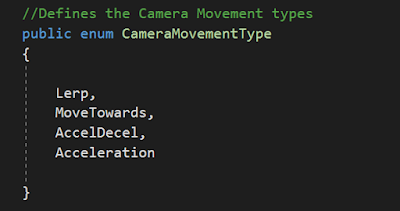 In order to have more options with the camera for Debug reasons, I followed an online tutorial for enumerators, which is a set of rules to follow, which can be switched. I set up four camera types: Lerp, MoveTowards, AccelDecl, and Acceleration.
The different Camera types were used in the switch function below.

 At the beginning of the Update function, there is a Vector3 being set to the mouse positions on the screen, and then setting variable mouse, to that position. It is then rotating the aim guide to point towards the mouse, so you know where you are shooting.
The disFromCamera Vector3 is getting how far away the player is from the camera. It is followed by several if statements checking the distance, and setting whether the camera is moving or not. If the camera is moving, it will call the CameraMovement function.
After that, its setting the projectile spawn to the players locations, and also setting the healthbar to the current health.

 To start we will look at the variables that are used inside of this script. There are alot. At the top we have the basic player stats, such as health, maxhealth, and level. Below that we have the Misc Player info, which could be brought into play later in development. Below that we have a misc placeholder for the healthbar. Then we have all of the Projectile Variables, such as the power, timebetween shots, and more. These are used to store all of the information needed when the player is firing a shot. After that we have all of the player movement variables such as speed, Camera variables, and more. These will all be used later on in the scripts, and can be set in the properties of the object so you do not have to edit the script when you want to make a change.
Next, we have the start function. This will run when the game starts. It will first set the projectile type to the most basic type, as thats what you start out with. Next it sets health to mac, and sets the healthbar to the proper gameobject. It then sets all of the projectile stats to 0, and assigns the camera to the Cameraholder.

The different Camera types were used in the switch function below.

What is happening in this switch function is that based on which option is selected (out of the four above,) it will change the way the function is called. For example, if the camera type is set to lerp, it will use the CameraMovementType.Lerp case, which will make the camera lerp between positions.

The disFromCamera Vector3 is getting how far away the player is from the camera. It is followed by several if statements checking the distance, and setting whether the camera is moving or not. If the camera is moving, it will call the CameraMovement function.
After that, its setting the projectile spawn to the players locations, and also setting the healthbar to the current health.
Communication - Designer Meeting
Communication is one of the most important parts of human life. It is what gets us through the day alive and well, it is what helps us to understand ourselves and those around us. If we cannot learn to communicate, we might as well not be alive.
Communication is especially important in team settings. How do you expect to get a project done if you do not talk to your team? Often times people in the team will not know what to do or how to do it due to the lack of communication between team members. If they are too afraid to speak it could end up destroying their career.
I feel team bonding exercises play a very important role in developing a team, as it will help the team members feel confident talking to each other, which could prevent the issue listed above. Without the team feeling connected they will not work well together, which will lead to a bad or cancelled project or product.
Often times people are scared to speak up, or ask for help, from their superior, and this will often not get better over time. Although humans are social creatures, they are also creatures which can be scared off very easily. I, personally, have trouble talking to the people around me. It’s for the common reasons, such as Im afraid they'll judge me, make fun of me, or talk about me behind my back. Then there are the uncommon reasons such as not wanting to disappoint myself by making a bad first, second, third, or hundreth impression. This will often lead to me hardly talking to my team, and working on the project alone, which is not good.
What I took out of the conversation we had was that team bonding and relationships are very, very important in order to work hard a raise morale. If you’re not comfortable around your team, the people you work with everyday, will you be comfortable with everyday situations? I think that we need to find a way to help strengthen teams within Warren Tech.
Tuesday, February 13, 2018
Rigid Bodies
A Rigid Body in physics is defined as "a solid body in which deformation is zero or so small it can be neglected."


In this example, we will be looking at Rigid Bodies in Unity, and the physics that go into them.
In order to make an object a rigid body in Unity, you must add the Rigid Body Component into the object.
Once inserted, it should look like this...

Rigid Bodies can be applied to almost every object in Unity...

The default Unity rigid body settings applies a realistic set of physics onto these object, including gravity.
(It Even works with 2d!)

Monday, February 12, 2018
MORE SPLINES
Splines can be used in several ways to develop games, one of those ways is to rig a virtual camera rail that the camera can follow. This is a built in feature in Unreal Engine 4
 This is an example of the Camera rig rail, which uses spline(s) to create a path for the camera to follow. This, combined with Lerp can give off a wonderful effect for the camera, and can create a smooth cutscene. This can also be called Spline Interpolation.

Monday, February 5, 2018
2/5/19 - Game Jam and the Week that followed
This past weekend was the Creative Jam for 2018. The Creative jam was a fun, educational experience. The theme was "Bewitched, Bothered, and Bewildered," Which obviously led to the creation of some horror based or inspired games. My Team went for a VR Scene project, based off of Hansel and Gretel. This project was heavily ART based. I Think that the Artists did a fantastic job with their assets from making them to applying UV maps to them. However; there was some 'drama' in our team, and blames were thrown around after the game jam. Overall, it was a successful game jam, and I learned a lot about teamwork, working under pressure, and how to stay up for 42 hours straight.
Wednesday, January 17, 2018
25 Game Ideas
1) A game where you fold laundry competitively
2)A game where you organize your shoes in a set time limit
3)A game where you make your bed
4)A game where you construct doors
5)A game in which you must solve math problems in order to defeat your math teacher
6)A game where cats rule the world
7)A game where you must repair a car and change tires in order to gain experience to change rich people's tires on their ferraris
8)A game where gravity is inverted
9)A game where you must travel along an ocean, but the waves are a series of sin, cosine, and tangent functions.
10)A game where you must survive the cold by rapidly constructing space heaters.
11)A game where you must learn from an old monk how to make the best coffee available to man-kind. You must upgrade your business and learn the true power of coffee. Americano Hero
12) A story based game where Plants have taken over the world where you and a squad of zombies must destroy them before it is too late.
13) A game where you lose everything in a casino including your family.
14)A game where you stack water bottles to see how tall you can get your tower.
15)A game where you make money by painting and selling self portraits.
16)A game where you fight your co-workers through a series of minigames
17)A game where you design coats and build up your company through intense financial and marketing decisions.
18)A game where books were banned and the world is very boring.
19)A world where the world is very exciting and vibrant, and the player must traverse it in order to meet an old mentor. The player will then proceed to make the world boring (plot twist)
20)A game where you slowly raise an army of tiny ducklings in order to take over the world, while also managing their health.
21)A game where you manage cables.
22)A game in which you travel to space by ANY means necessary.
23)A game in which you must fix a car using only fruit
24)A game in which you must survive by doing advanced algebra
25)A game in which you are a game designer designing a game which will change the design of games forever.
2)A game where you organize your shoes in a set time limit
3)A game where you make your bed
4)A game where you construct doors
5)A game in which you must solve math problems in order to defeat your math teacher
6)A game where cats rule the world
7)A game where you must repair a car and change tires in order to gain experience to change rich people's tires on their ferraris
8)A game where gravity is inverted
9)A game where you must travel along an ocean, but the waves are a series of sin, cosine, and tangent functions.
10)A game where you must survive the cold by rapidly constructing space heaters.
11)A game where you must learn from an old monk how to make the best coffee available to man-kind. You must upgrade your business and learn the true power of coffee. Americano Hero
12) A story based game where Plants have taken over the world where you and a squad of zombies must destroy them before it is too late.
13) A game where you lose everything in a casino including your family.
14)A game where you stack water bottles to see how tall you can get your tower.
15)A game where you make money by painting and selling self portraits.
16)A game where you fight your co-workers through a series of minigames
17)A game where you design coats and build up your company through intense financial and marketing decisions.
18)A game where books were banned and the world is very boring.
19)A world where the world is very exciting and vibrant, and the player must traverse it in order to meet an old mentor. The player will then proceed to make the world boring (plot twist)
20)A game where you slowly raise an army of tiny ducklings in order to take over the world, while also managing their health.
21)A game where you manage cables.
22)A game in which you travel to space by ANY means necessary.
23)A game in which you must fix a car using only fruit
24)A game in which you must survive by doing advanced algebra
25)A game in which you are a game designer designing a game which will change the design of games forever.
Monday, December 11, 2017
10/25/17
As of today, I am going to be putting more work into these blogs, keeping it open while I work, and taking note of whatever I do.
The first thing I did was attend my first design meeting. We went over some of the student's stories and gave feedback towards them. We then talked about the major issue of IN GAME PURCHASES (echo a couple times.) We talked about the advantages and disadvantages of using them for game developers. Also, we talked about their monetization strategy.
The first thing I did was attend my first design meeting. We went over some of the student's stories and gave feedback towards them. We then talked about the major issue of IN GAME PURCHASES (echo a couple times.) We talked about the advantages and disadvantages of using them for game developers. Also, we talked about their monetization strategy.
12/6/17 MATH / BLOG
Recently, I've been tinkering with Unreal Engine 4's built in lighting and rendering, trying to get a nice looking product. A lot of math goes into the lighting, and there are several variables that you can change. First of all, I believe the most important thing is the light falloff. The light falloff is defined as "the rate at which light loses its energy as it travels away from its source." The falloff can be separated into two categories, a Falloff Exponent, and an Inverse Square Falloff. The Falloff Exponent is a very simple lighting system that produces a light who's brightness is based on an exponent.

The inverse square falloff, however is much closer to reaching realism in lighting. It uses the Inverse-Square Law, which is defined as "The inverse-square law, in physics, is any physical law stating that a specified physical quantity or intensity is inversely proportional to the square of the distance from the source of that physical quantity. " So in lighting, this would mean that the intensity of the light radiating from a point source is inversely proportional to the square of the distance from the source.

For an example, we have the Intensity of the light (I), the Brightness of the light (P), and the area of a sphere of radius (A, or 4𝝅r²), and the distance(r).
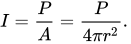
The intensity decreases (divided by 4) as the distance r is doubled.
The inverse square falloff, however is much closer to reaching realism in lighting. It uses the Inverse-Square Law, which is defined as "The inverse-square law, in physics, is any physical law stating that a specified physical quantity or intensity is inversely proportional to the square of the distance from the source of that physical quantity. " So in lighting, this would mean that the intensity of the light radiating from a point source is inversely proportional to the square of the distance from the source.
For an example, we have the Intensity of the light (I), the Brightness of the light (P), and the area of a sphere of radius (A, or 4𝝅r²), and the distance(r).
The intensity decreases (divided by 4) as the distance r is doubled.
Friday, December 1, 2017
11/27/17
The past week has been thanksgiving break. Over break I practiced working with some more complex blueprint, including event dispatchers. The week after break I have been practicing more with VR Blueprints, such as Navigational meshes, and tweaking the teleport UI.
Monday, November 13, 2017
11/9/17
Coming up to the end of the second game jam, I have learned alot about team management and co-operation. In the first week of the game Jam, I had to work with character possession as well as trying different post processing effects. I used the normal amount of math, such as vectors. In the second week of the game-jam I began to work with Animation and character blueprints, as well as Animation spaces. I had to mess with them quite a bit before I got it working.
Wednesday, October 25, 2017
10/18/17

This past week I have been messing around the UE4's 2d plat former template. I made some practice sprite sheets in order to learn how to animate basic 2d sprites. I practiced working with flipbooks in UE4, seeing how they functions and making basic flipbooks such as an Idle animation and a Run animation.


I also worked with materials as well, including working with textures that line up no matter where they are in the world space.
Random Isn't Random
Many Random Number generators that are included with programming languages aren't really random at all. These often use Pseudo-Random Number Generators. This means that every output is predetermined by the computer, making it deterministic. When it is started, it generates tons of 'random' numbers, and when a value is needed, it just chooses the next number in the list. Seeds are also used in these pre-determined numbers, and each seed is a different pattern.


This can be seen in a test made using python on Trinket. Multiple tests showed the dots appearing in what seems like a non-formal pattern, but after awhile, it would only repeat the dots it had already been too, and the blank spaces would never be filled in. This can be seen with Unreal Engine 4 as well.


Thursday, October 5, 2017
10/5/17
As of 10/4/17 I am starting work on the "The Inventor" project lead by Mr. Compton. I will be programming for this project. I am going to need to learn more about construction scripts, cascade, and VR Programming in Unreal Engine. I am also going to start learning C++ with Unreal engine.
Tuesday, October 3, 2017
10/3/17 - Linear Interpolation
For this weeks math Monday we were assigned to research Linear Interpolation or Lerp. Linear Interpolation in mathmatics is defined as "a method of curve fitting using linear polynomials to construct new data points within the range of a discrete set of known data points." In more simple terms LERP Draws an imaginary line between point A and B and tells how far along the line you are. LERP is often used when making games in order to either blend a transformation, material or more. For Example:
 In this example I am Lerping two texture samples together, or in other words, I am joining them together along a line.
A Lerp can also be used to move an actor between two locations. For example I set up a platform which contained a start and an end collision box. I then got the location of the two collision boxes and made the platform lerp between the two over a timeline.


A Lerp can also be used to move an actor between two locations. For example I set up a platform which contained a start and an end collision box. I then got the location of the two collision boxes and made the platform lerp between the two over a timeline.

Tuesday, September 26, 2017
Math Monday: DotProduct
Dot Product
Dot Product is the Algorithm used to determine the lighting of an object. In order to find the Dot Product you need to first get the normal of the face, and then find the angle between the start of the normal and the light source ( as seen in the diagram .) The greater the angle in between, the darker that face will be.

Friday, September 22, 2017
Game Jam Week
The week of 9/18/17 - 9/22/17 was the first game jam that I have participated in. This is the first time I have been put in a team scenario. The theme of the game jam was circles, so our team made a game about co-operation because circles are often related to friendship and trust. Making this game made me learn stuff I had never worked with before such as working with Matinees and Level Sequences, as well as editing the character. I also had to learn how to use event dispatchers and Casting functions to get the desired result. This game jam also helped with social skills and was good practice for how a studio would feel.
Monday, September 18, 2017
Math Monday 9/5/17
Vectors represent many things in a programmers world. It is most frequently found to represent the location of an actor or object. This can be 2d or 3d. Its defined in MathMatics as "a quantity having direction as well as magnitude, especially as determining the position of one point in space relative to another." In programming the Vector can be used as many things, from variable to function.
Subscribe to:
Posts (Atom)